The room
What happens inside the room.
Your firm opens it. Your client walks in. The AI does the asking, you do the deciding, and everything that happens leaves a record you can hand to someone else.
Illustrative sample matter. No client data. Move through the tabs and choose what happens next.
You are supervising. Choose what happens next.
AI extractions are unconfirmed until your team reviews them.
Contradictions to resolve (1)
The stated time of the fall differs between the intake conversation and the uploaded incident report.
Every material action on this matter, by your team and by the AI. No row carries message content.
| When | Action | Actor | Resource |
|---|---|---|---|
| 2026-07-18 09:14 | invitation.create | R. Vance · user | invitation |
| 2026-07-18 11:02 | invitation.accept | M. Alvarez · user | invitation · notice v2026-07-01 |
| 2026-07-18 11:07 | chat.conversation.create | M. Alvarez · user | conversation |
| 2026-07-18 11:09 | ai.model_run | CounselRoom · ai | model_run · prompt v3 |
| 2026-07-19 08:31 | fact.review | D. Okafor · user | fact F-13 |
| 2026-07-19 08:33 | fact.correct | D. Okafor · user | fact F-15 · version 3 |
| 2026-07-19 14:20 | matter.ai.pause | D. Okafor · user | matter |
| 2026-07-20 10:05 | document.upload_complete | M. Alvarez · user | document · sha-256 recorded |
| 2026-07-20 16:44 | matter.legal_hold_place | R. Vance · user | matter |
| 2026-07-21 09:12 | matter.export | D. Okafor · user | export packet |
Uploaded by the client or the team, held for the matter, and released only to people on it.
Documents are stored for the matter team. They are not fed to the AI, so nothing your client uploads becomes model input.
Exhibit C · Matter workspace. Pilot build; the flow shown is illustrative, not live.
01 · How it runs
The four moves.
-
Invite your client
Your firm issues a single-use invitation. Your client accepts it and lands in a room tied to one matter. There is no public signup and there is no anonymous door, so the only people in the room are people you put there. -
The AI gathers facts under supervision
A responsible attorney is on the matter before your client can type anything. The assistant introduces itself as an AI, asks one question at a time, and never gives legal advice. Any attorney or staff member on the matter can pause it mid-conversation, and the firm has a switch that stops it everywhere. -
Review what it found
Facts arrive marked unverified. You confirm what is right, dispute what is not, and corrections are recorded as new versions rather than quiet edits. Where the account contradicts itself, that lands in a review queue instead of being smoothed over. -
Export or hold
Take out a matter packet that labels what came from the AI and what an attorney reviewed. If the matter goes on legal hold, deletion stops.
02 · Review
Nothing the AI says is a fact until you say so.
Every extraction lands as unverified and stays that way until an attorney touches it. Your client never sees an AI conclusion presented as settled, because it is not settled until you settle it.
Structured output is checked against a schema before it is written, so a malformed or unexpected answer never becomes part of the matter record in the first place.
03 · The line
What the AI does, and what only you do.
The line is not a setting you can move. It is built into where the software stops.

The AI
- Asks your client what happened, one question at a time
- Organizes the answers into structured facts and a timeline
- Flags contradictions and gaps for your attention
- Prepares source-linked research for review
- Says plainly that it is an AI and not a lawyer
Only a lawyer
- Decides whether a fact is a fact
- Decides what any of it means
- Gives your client advice of any kind
- Approves anything before your client relies on it
- Decides whether this tool belongs in this matter at all
04 · Comparison
Where else your client could be typing.
Your client will describe their matter somewhere. These are the realistic options, described by how each one is built.
| CounselRoom | Public AI chatbot | Text message | Personal email | Portal, no AI | ||
|---|---|---|---|---|---|---|
| Who controls access | Your firm, one invitation at a time | The provider, and whoever holds the account | Both device owners and their carriers | The account holders and the platform | The account holders and their mail providers | Your firm |
| Who agreed to the terms governing it | Your firm, in a written agreement with us | Your client, at signup. In United States v. Heppner (S.D.N.Y. 2026) the court examined those consumer terms and found the channel was not confidential | Your client and their carrier | Your client and the platform | Your client and their mail provider | Your firm |
| Is a lawyer in it by design | Yes. A responsible attorney is on the matter before your client can enter | No | Only if someone remembers to include one | Only if someone remembers to include one | Only if someone remembers to copy one | Yes |
| Is AI output labeled and held for review | Labeled to the client as AI, and unverified until an attorney approves it | No. Once it is copied out, nothing marks it as AI | No AI in the channel | No AI in the channel | No AI in the channel | No AI in the channel |
| Can your firm stop the AI | Yes. Pause per matter, or switch it off firm wide | No | Not applicable | Not applicable | Not applicable | Not applicable |
| What record exists of your supervision | Material actions recorded with an actor and a time, without message content | Whatever the provider keeps, on their schedule | Message timestamps | Message timestamps | Mail headers | The portal's access log |
| Can deletion be blocked for a hold | Yes. A legal hold stops deletion on the matter | No. The account holder can delete the account | Either party can delete their copy | Either party can delete their copy | The mailbox owner decides | Yes, firm controlled |
| What you can produce if challenged | A packet labeling AI-generated versus attorney-reviewed content, plus the action record | Whatever the provider still holds | Screenshots | A chat export | Mailbox exports | Documents and the access log |
This table describes how these channels are built, not how a court will treat them. Nothing here says any channel is or is not privileged, and nothing here is legal advice. Consumer terms change, so read the current terms for any tool your client is actually using.
05 · Provenance
The record it leaves.
Material actions are recorded with an actor and a timestamp: invitations issued and accepted, people added to a matter, every AI run, every review, every export, every legal hold.
What is deliberately not in there is the content. No message bodies, no document text, no prompts. The record answers who and when, which is what anyone asking will actually want to know.
Each AI run carries its own provenance too: which model, which version of the prompt, how long it took, and a fingerprint of what went in and came out.
06 · Export
The thing you hand over.
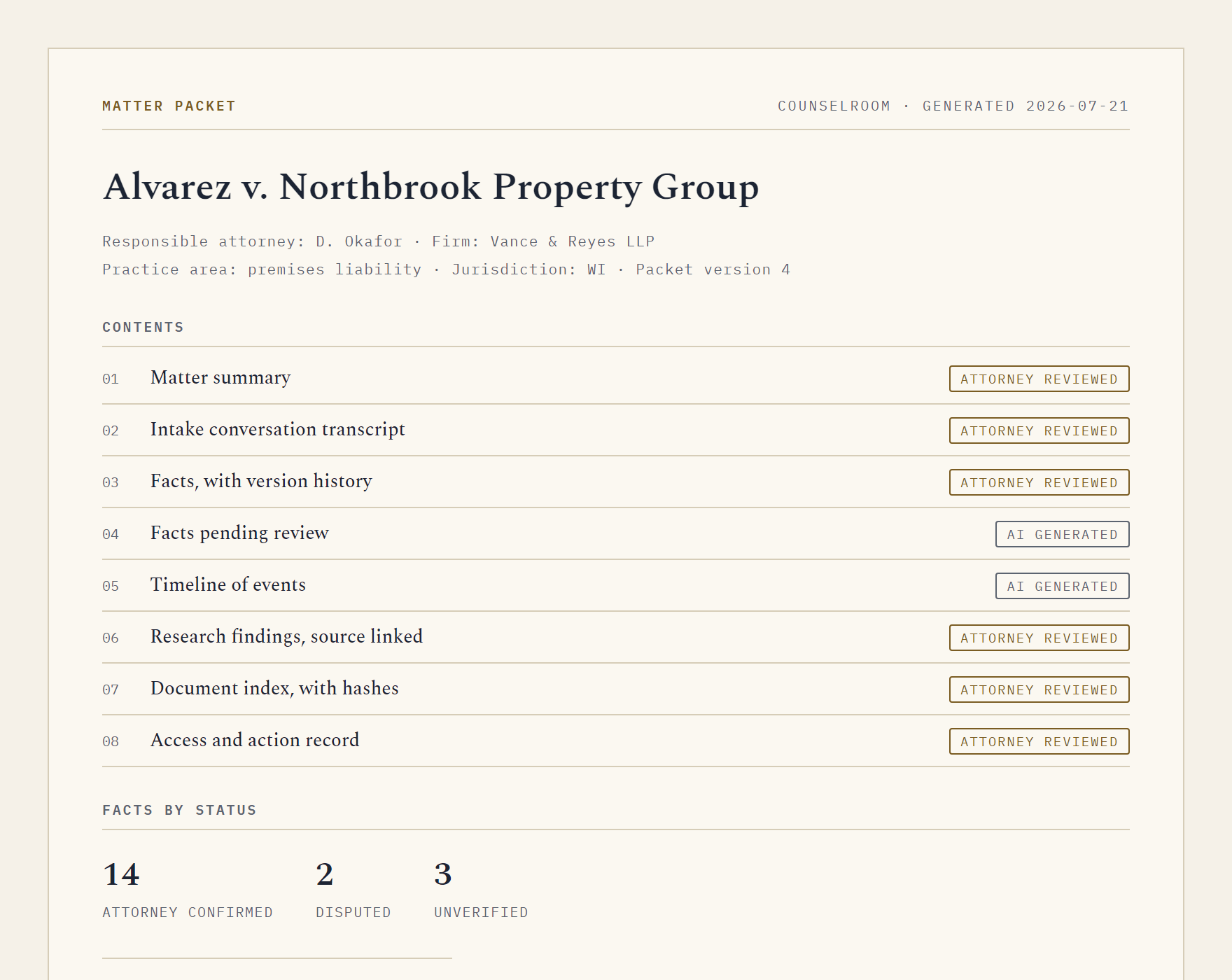
When the matter moves on, take the file with you. Every section of the packet is marked with where it came from, so nobody has to guess which parts a lawyer stood behind.
Cross-examination
Three more questions.
Is this a chatbot that gives my client legal advice?
No. It gathers facts, it declines to advise, and it tells your client on the way in that it is an AI and not a lawyer. Advice is your job and the software is built to keep it that way.
Does it replace my intake staff?
No. It does the first pass of asking and organizing, at whatever hour your client is awake, and hands your team a structured starting point instead of a voicemail.
What happens when the AI gets something wrong?
You dispute it, and the correction is written as a new version with the original still visible. Nothing is quietly overwritten, which matters if anyone later asks what changed and when.
Open a room for one matter.
CounselRoom is in an invite-only pilot for small and midsize firms.